My Dashboard
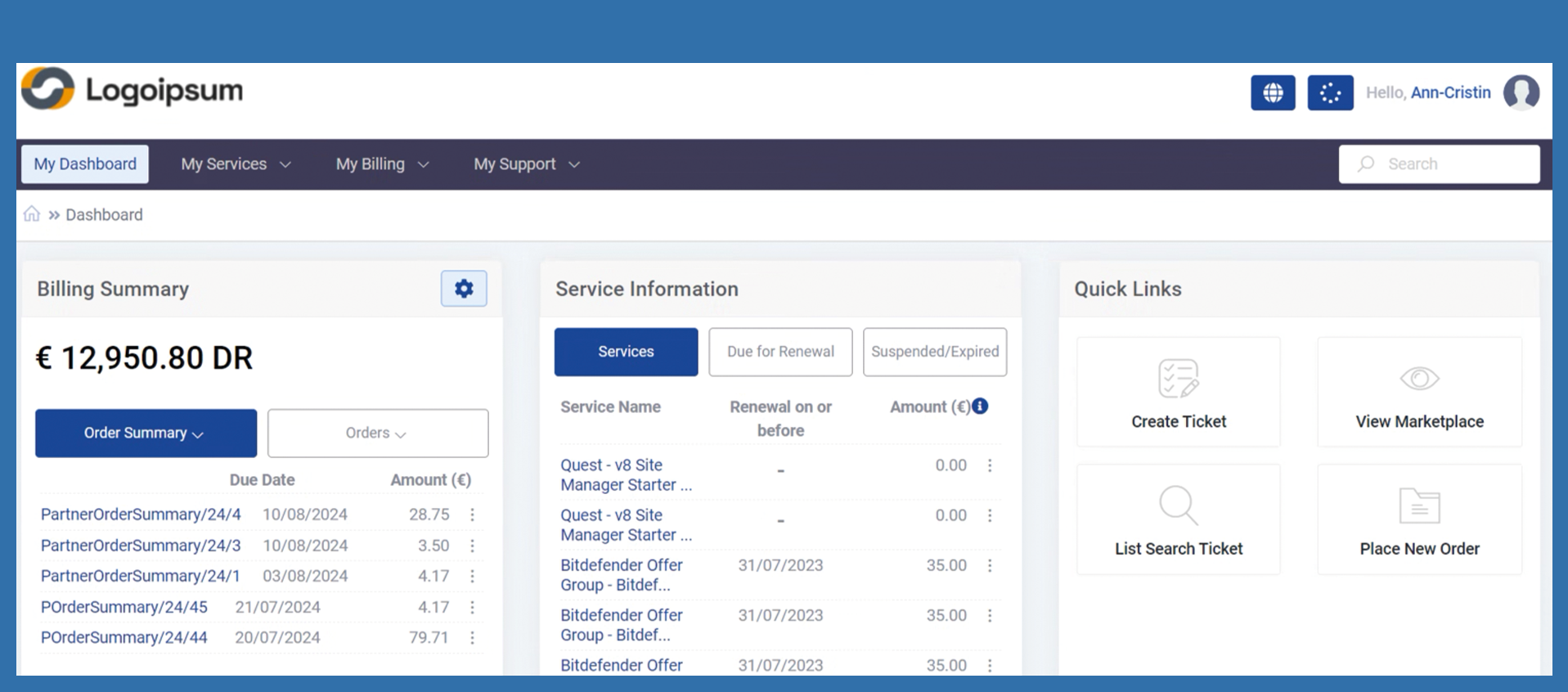
After the end customer has logged in, the dashboard is displayed first. Various functions are available from here.
Billing Summary
To the right of the name Billing Summary end customer will find Settings.
Further end customer can access the following functionalities via these settings:
End customer can access order confirmations (invoices) and orders via quick access. If you open the respective drop-down, filtering is already possible.
The latest order summaries are displayed, including payment term and amount.
By clicking on the three dots behind the amount, you can view the corresponding order summary or download the order summary as a .pdf file.
If the end customer clicks on View all, they are redirected to the corresponding overview. Please note which button you have previously selected.
Service Information
End customer can click on the various buttons under Service Information, to see his already purchased licenses will be displayed. The renewals that are due for renewal are also displayed.
Click on the three dots after the amount to display further functions. From here you can write a support ticket for the selected license.
If the end customer clicks on View all, they are redirected to the corresponding overview. Please note which button you have previously selected.
Quick Links
Under Quick Links end customer will find redirects to frequently used pages of the member panel. Create ticket takes your end customer to the creation of a support ticket in the event of a request for help. Here you will find the description in the knowledgebase for creating a ticket.
View Marketplace redirects the end customer to the landing page of the partner's Marketplace. From here, they have various options, including starting an order process.
Under List/Search Ticket, the end customer can see which tickets he has already created or a general overview of tickets created so far. For more information, please click here.
Under Place New Order, the end customer is forwarded to the shopping cart for creating an order. An order can be created in several ways, here you can find the information in the knowledge base.